Free Invoice, Billing & Receipt Generator
AbabioApps provides a free online invoice and billing generator designed for
small businesses, freelancers, entrepreneurs, and anyone who needs a simple
way to create professional financial documents. Create invoices, generate
receipts, track payments, and manage billing information from one easy-to-use
web application.
Whether you are billing customers for services, selling products, collecting
payments, or providing proof of purchase, AbabioApps helps you create
professional PDF documents without expensive accounting software or complicated
setup.
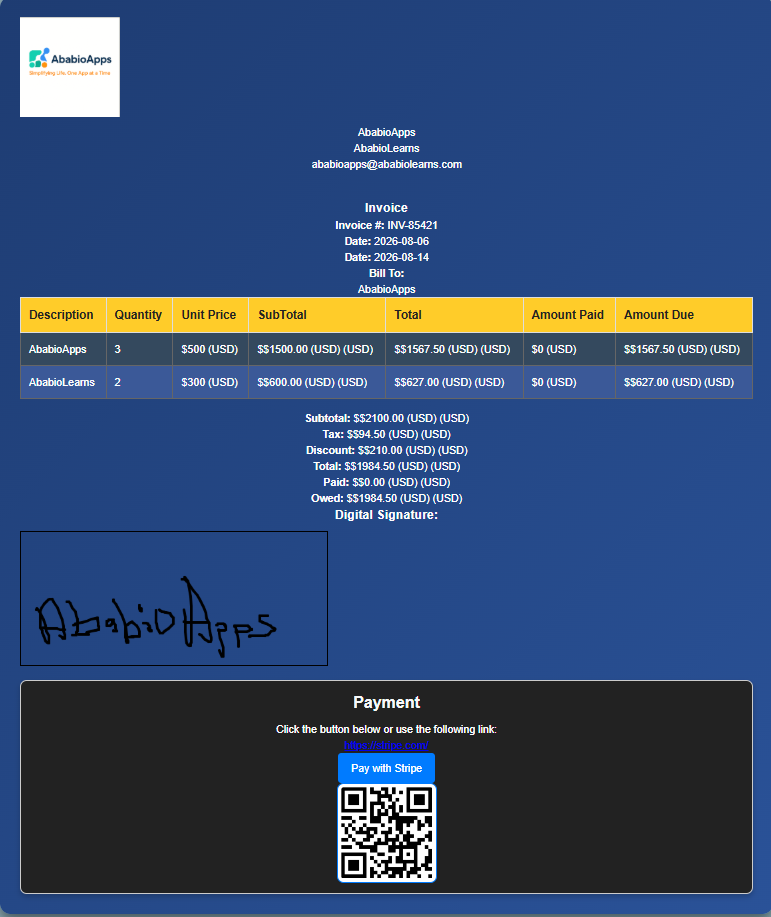
Create Professional Invoices for Any Business
A professional invoice helps businesses clearly communicate what customers
owe, when payments are due, and what products or services were provided. With
AbabioApps, you can customize invoices with your business name, logo, payment
information, taxes, discounts, customer details, and itemized services.
- Create downloadable PDF invoices
- Add your company logo and branding
- Calculate taxes and discounts automatically
- Add payment links for easier checkout
- Support multiple currencies worldwide
- Create recurring invoices for repeat customers
Generate Business Receipts Online
In addition to invoices, AbabioApps can be used as a receipt generator for
businesses that need proof of payment. Create clean and professional receipts
for customers after completing transactions.
Receipts are useful for retail businesses, freelancers, contractors,
consultants, online sellers, and service providers who need to document
customer payments.
- Create payment receipts
- Record customer transactions
- Track paid invoices
- Provide customers with payment confirmation
Simple Billing Management for Small Businesses
Managing customer billing does not have to require expensive accounting
platforms. AbabioApps provides simple billing tools that help you organize
invoice information, monitor payments, manage recurring charges, and keep track
of business transactions.
Whether you are a freelancer sending monthly bills, a small business managing
customers, or an entrepreneur tracking sales, this online billing generator
provides the tools needed to create professional financial documents quickly.
Who Can Use This Invoice and Billing Tool?
AbabioApps is useful for many types of users, including:
- Freelancers billing clients
- Small businesses creating customer invoices
- Contractors sending service bills
- Online sellers generating receipts
- Consultants managing client payments
- Entrepreneurs tracking business transactions
Why Use an Online Invoice Generator?
Traditional invoice creation can require spreadsheets, templates, or expensive
accounting software. An online invoice generator makes the process faster by
allowing you to create professional documents directly from your browser.
With AbabioApps, you can create invoices, receipts, and billing documents
quickly while keeping control of your business information.
Frequently Asked Questions About Our Invoice Generator
Is this invoice generator free?
Yes. AbabioApps provides a free online invoice generator that allows you to
create professional invoices without registration. You can add your business
information, customer details, products, services, taxes, discounts, and
payment information to create customized invoices.
Can I create receipts?
Yes. AbabioApps can be used to create professional payment receipts for your
customers. Receipts can help businesses provide proof of payment, document
transactions, and maintain better financial records.
Can I use this for billing customers?
Yes. This online billing tool can help freelancers, small businesses,
contractors, and service providers create customer bills, track payments, and
manage recurring billing needs. You can create invoices for products,
services, subscriptions, and repeat customers.
Can I download invoices as PDF?
Yes. You can generate professional PDF invoices that can be downloaded,
printed, or shared with customers. PDF invoices make it easy to send billing
documents while maintaining a professional business appearance.
Does it support multiple currencies?
Yes. AbabioApps supports multiple currencies, allowing businesses to create
invoices for customers around the world. You can select the currency that best
matches your business and customer location.
Can I email invoices directly to my customers?
Yes. AbabioApps can automatically generate a professional email template using
the information from your invoice, including the customer details, invoice
number, amount due, payment information, and a personalized message.
When you choose to email an invoice, the application opens your default email
client using your device's mailto: feature. The email subject
and message are automatically populated with your invoice information, saving
you time and reducing manual typing.
After downloading the invoice as a PDF, you can simply attach the PDF file to
the generated email before sending it to your customer. This gives you complete
control over the final email while making the invoicing process faster and more
professional.
Can I manage inventory while creating invoices?
Yes. AbabioApps includes a built-in inventory management system that helps you
keep track of your products while creating invoices. Simply add your inventory
items, set the available quantity, and specify the unit price. When creating an
invoice, you can quickly select items from your inventory instead of entering
them manually each time.
After an invoice is generated, the application automatically deducts the
quantities of the products used from your inventory. This allows you to monitor
stock levels, reduce manual calculations, and maintain more accurate inventory
records as your business grows.